
2013-11-06
The Main Window or Input screen is the first window that appears when starting PERF.
It contains a number of different possibilities and functions besides it’s primary role to be the screen where you define your truck specification and alternative specifications.
Following fields/options together make up a Performance Specification (click on each keyword for more information):
Select the engine you want to evaluate among the listed engines.
When you select an engine a more detailed description appears in a tooltip and in the message box (at bottom of page).
Select the gearbox you want to evaluate among the listed gearboxes. Use a transmission with AWD for a All-Wheel-Drive specification.
When choosing an automatic gearbox a new field will appear showing converter.
The automatic gearboxes are connected to specific engines. These connections are made to be able to get the right gear strategy. View Main Window Menu>>View>>Allowed Converters for right connections.
For FM/FH trucks there is either only one choice in the converter field or there are two and then with suffix -FH80, -FH85, -FM80 or -FM85 (for example "FS936-FH80"). "FH" means FH truck range and "FM" means FM truck range. "80" means that we can allow 20% losses from the converter into the cooling system (100%-20%=80%) and "85"means that we can allow 15% losses. So "80" has higher cooling capacity and makes the converter deliver higher torque. But the user only needs to know if he has an FM or an FH truck to make the right choice.
Select a Rear Axle to combine with the engine and gearbox among the listed rear axles.
Choose a Rear Axle Ratio among the listed. The list contains only valid ratio for the selected rear axle.
Choose a Tyre. The tyre will automatically fill a rolling radius for the selected tyre. The rolling radius is in this case not possible to alter.
If you want to set up your own tyre or rolling radius, choose the "space" tyre in the beginning of the tyre list. You can now type your own description and enter a rolling radius of your own choice.
The tyres refer to the driving wheel and implies that you have the same size on all axles.
The rolling radius is radius of the Tyre. See Tyres for more information.
Enter the total number of wheels on the combination. Every wheel in contact with the ground must be included. This includes the trailers wheels.
The number of wheels is only influencing the fuel consumption simulations.
Gross Combination/Vehicle Weight. The total weight of the vehicle or combination including payload.
The axle weight on the driving wheels. For bogies, use the total axle weight on the driving wheels. Use the normal driving weight including load.
For All-Wheel-drive use complete vehicle weight.
Default weights for different axle arrangements are available in the input box. For a bogie with a tag axle, 15 ton is given because it is possible to lift the tag axle and thereby increase the drive axle weight.
This input only affects the startability, see Performance Summary or Startability.
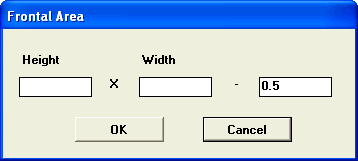
Enter Height and With. 0.5 is a default value for compensating for the area between the wheels.
Choose among the listed types of vehicles and CD values.

See Air Resistance and Drag Coefficient (CD) for more information.
Choose among the listed Rolling Resistance values.
Asphalt, Energy Tyre 50 N/tonne
Asphalt 55 N/tonne
Gravel 100 N/tonne
Country 1000 N/tonne
Choose among the listed values.
Asphalt 0.8
Gravel 0.6
Country 0.4
Snow 0.25
Choose among the listed Applications:
Combination
Single Distribution
Single Construction
Single Offroad
B-Double
Road Train
Calculated values for Gradeability (top gear) and Startability (crawler and first gear) will be shown in Performance Summary and compared with the VTC Requirements of the selected application.
This will give an indication if the Specification is suited for the customers intended operation of the vehicle.
Gradeability is calculated for the value of the speed limiter.
This function cuts off all target speeds on a road exceeding the speed limiter when making fuel consumption calculations (See Product Comparison and RoadSim).
Click this box to view Fuel consumption index in Performance Summary>>Product Comparison. This can only be done while being in the Spec-folder.
Fuel consumption index compare the fuel (diesel) within different alternatives. The basic Spec will get 100% and all the others will be related to the basic Spec.
When With indexed fuel consumption is marked you will be presented different roads. Read more in Product Comparison,
Other functions:
View File, Calculations, View, Settings, Help for a detailed description of each option. If any possibility is greyed (disabled) in the menu, it is not possible to perform.
In this area you will find the common data for all alternatives (Spec, Alt1...Alt5). Customer, Model, Specification Id and Status.
To add information in this field and to make the printouts more customer specific, use View>>Customer and dealer data. Insert Model, Customer, Dealer and if appropriate an extra Comment.
If you use the connection between VSS and PERF, these fields are already filled in.
Specifications and Alternatives area
This area consists of 6 buttons, named Spec, Alt1,....Alt5.
Behind each button (see it as a folder) a unique specification and eventually a result exists. If you use an alternative (by filling in data and making a calculation) the button text, for example Alt1 gets underlined.
If you press a button, you can open a saved specification or use the copy of the Spec (automatically copied) and create the alternative specification that you want to evaluate. You can use File>>Clear to empty the current alternative. If Spec is opened, all Alternatives will be cleared too.
If you use PERF together with VSS, the Spec is copied from the present quote, and the fields Engine, Gearbox, Rear axle and Ratio can’t be changed, except if the quote specification is not fully translatable compared with the Component database.
Product Comparison will give you an overview of information about all entered alternatives and their corresponding calculations from Product Summary.
In the bottom of the window a message line is shown. The message line shows a first help for the field in focus, or a status message from the application. When you select an engine the message line will give you some of the kola names. For some engines the message line will also give the first week that the engine was globally introduced.
After you have entered input in all the input fields, the Calculate-button , is enabled, meaning that calculation is possible. The selected calculation method is visible over the Calculate-button. Default Calculation is Performance Summary, to change calculation choose Main Menu>>Calculations.
The Tick Mark  is a common button used frequently in PERF and VSS. If it is used on the Main screen it means Exit the PERF application, but if it is located on other screens in PERF it means Close Window.
Save a Performance Specification:
If you want to save a Performance Specification, you must use File>>Save, Save As or File>>Save File, Save As File. Nothing is saved automatically.