2013-11-06
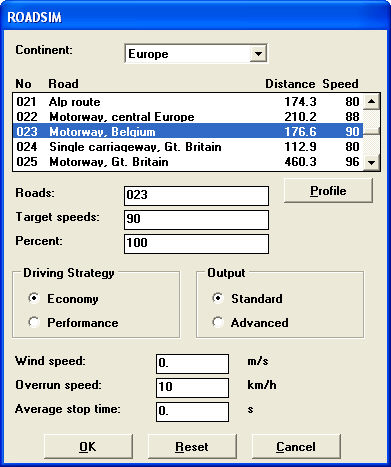
ROADSIM (Road Simulation) simulate the specification on a selected road. When you select Calculations>>ROADSIM, an Option window appear. In this window, the following selections can be made:
Road Selection. The road selection contains several different roads with different target speed (use Continent to select the geographical area you are interested in).
The target speed presented is the typical target speed on the road. This value can be changed, but this will change the target speed for the whole road. Example: The target speed for Motorway Belgium is 90 Km/h. If you set Target speed to 110 Km/h, you will raise the target speed for the whole road by a factor 110/90. If you want to limit the max target speed, set the Speed Limiter in the Main window instead. This will keep the target speed that is lower than the speed limter but "cut off" the peaks in the target speed that are higher than the speed limter.
To see the max target speed, click on the Profile button and look in the graph.
In Standard output you are able to join multiple roads from the road selection list. This is done by clicking on more than one road. Choose a percentage for each road. The percentage sum must add up to 100%.
Profile. Use Profile to view the road profile and the target speed. This will not work when more than one road are selected.
Driving strategy. Economic Gear shifting points are set according to the engine. Performance Gear shifting points are raised according to economy gear shifting points. This option is not valid for automatic transmissions.
Output. Choose to view result in Standard or Advanced mode. Standard gives a short version of the extensive results, while Advanced gives the full results.
Wind and Overrun speed. Wind speed is defined as head-wind in the same direction as the truck is driving. Overrun speed is the allowed overrun speed when driving down-hill.
Average stop time. This is mostly used for Bus applications to specify the length of each stop.
Having made appropriate selections, choose OK and following Result page will appear:
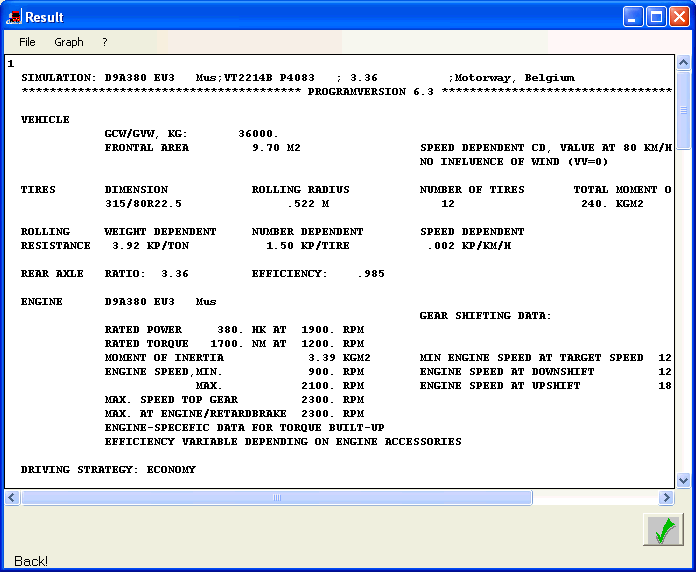
In Standard Output the following information is shown:
Distance
Fuel (diesel) consumption ( litre / 100 km )
Note! Figures are intended as a guide to assist with vehicle specification only. The figures produced are NOT a guarantee of actual fuel consumption that will be achieved. Read more in PERF Limitations.
Total fuel ( litre diesel )
Total Gearshift ( Number / km )
Downshift ( Number / km )
Upshift ( Number / km )
Time
Average speed
Max. speed
Base shift
Rangeshifts
Splitshift
Net average output
Net average torque
Gear information on how many percent of the gear that are used on the selected road and the vehicle speed on every gear
Following information is added in Advanced Output (examples below):
Engine load matrix.
Gear shift matrix
Distance in gear
This shows the percent of the maximum torque at different engine speed.

In this case the engine is loaded with 75% or more at a speed engine between 1250 and 1400 3.8% of the time.
Most of the time we are driving at 1400-1550 rpm.
Gear shift matrix gives the information which gear the driver change between.
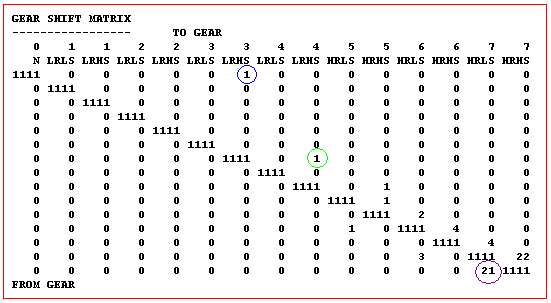
Example:
We can se that the driver start at gear 3LRHS (blue circle), after that he change to 4 LRHS (green circle).
We can also se that the driver change from gear 7 HRLS to 7HRHS 21 time (purple circle).
Distance in gear shows what gear that are in use as a percentage of the total distance for the selected road.
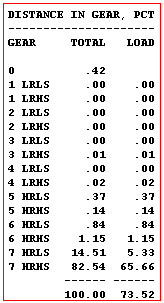
The total refer to the whole road and load refer only to the time when we have a load on the transmission. In this case we can se that we are using load on the transmission 73.52% of the road.